Notes to recaps
Turn your session notes into a recap your players can use
You have a page of notes from last night. Half a dozen names, a bargain with someone you did not quite trust, and a reminder that the party left through the cellar. Your players need enough of that story to pick up where you stopped.
You can turn those notes into a recap without recording the session, completely free. Recap Raven’s manual import gives older adventures a place alongside your recorded sessions, too.
If your table prefers not to be recorded, you can still create recaps from your notes and share your campaign through our free, opt-in Showcase.
Organise your TTRPG notes into a session recap
Start with the notes for a single game. Include the people the party met, decisions they made, discoveries and where the session ended. Rough sentences and bullet points are fine.
Expand any shorthand that would confuse someone else. “M owes us” becomes useful when you add who M is, what they owe and why. Keep uncertainty visible: if you do not remember which player made the deal, leave that open.
For future games, our session-notes guide covers the few details most worth catching while you play.
Note imports do not include the recording-based analytics or detailed GM feedback available with eligible recorded sessions.
Keep next week’s secrets out of the source notes
Separate what the party learned from what you know as GM. A recap of yesterday’s game should describe the merchant’s offer; the plan for that merchant to betray the party belongs in your private prep.
Recap Raven keeps your imported source notes private. It tries to make sense of your notes and separate anything players should not know from the player-safe, shareable recap. The generated recap can be read through the campaign’s existing player access, so check it for spoilers before drawing everyone’s attention to it.
Import the notes into your campaign
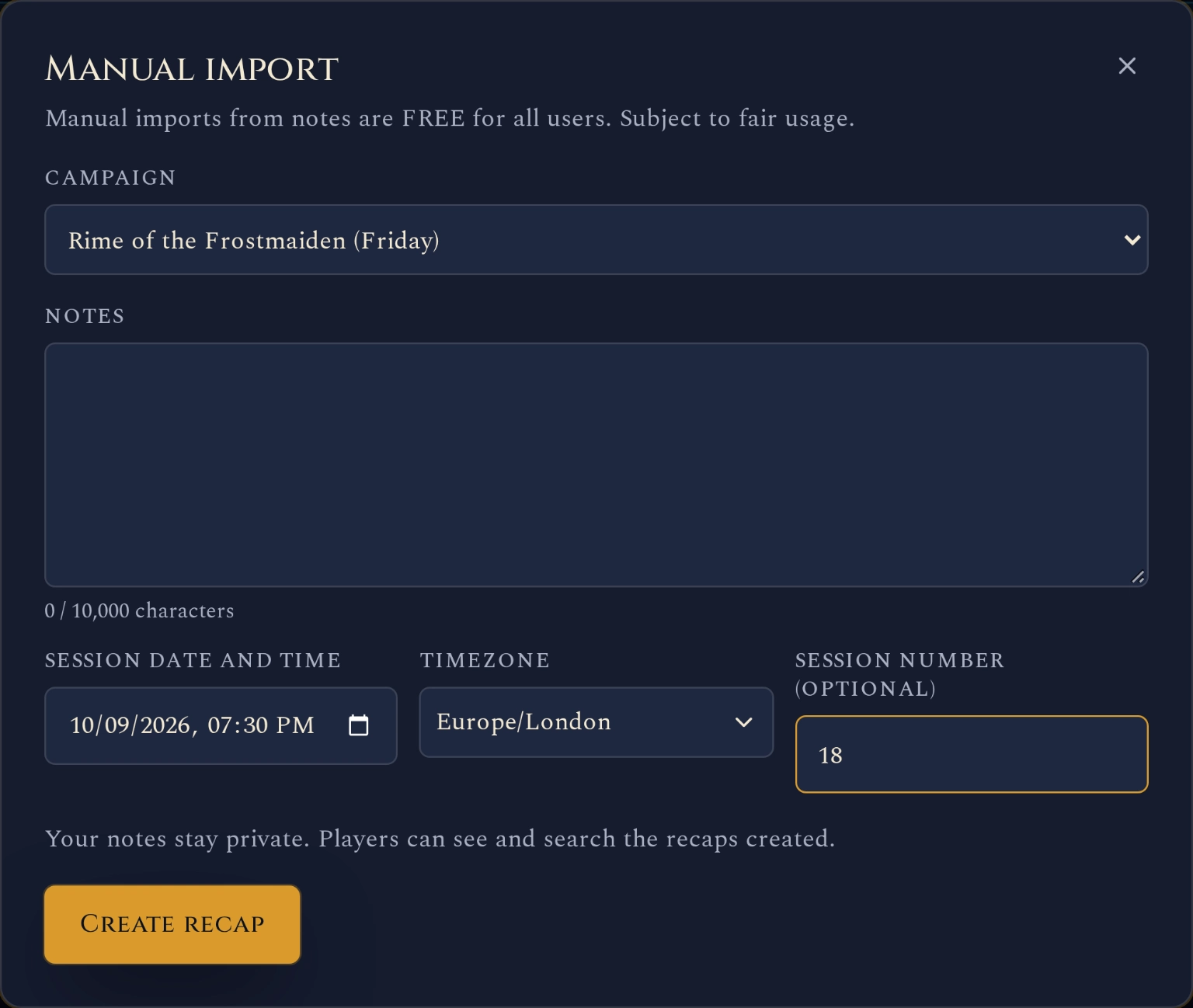
Create or open your campaign, go to Recaps and choose FREE MANUAL IMPORT. Paste one session’s notes, enter the date you played and check the timezone. You can add the session number if you have one.
Each import accepts up to 10,000 characters. Choose Create recap, then open the result. Your source text remains available in Manual notes.
Joining midway through a campaign? Importing your earlier session notes is a great way to bring Recap Raven up to speed with the adventure so far.
Read it once with next session in mind
Check character names, promises, discoveries and the final scene. Those are the details your players will carry into the next game.
When you record with our Discord bot, Recap Raven has the conversation to work from, including the context around what happened. That makes it easier to identify NPCs, locations and items, and track them across eligible Searchable Memory sessions. With scattered notes, more needs interpreting, depending on how much you wrote. Add missing details and correct anything the recap misunderstood.
Finish by checking that a player who missed the game could tell where the party is and what they are doing next.
Whether you import earlier sessions or start with your next game, you can record with our Discord bot and let Recap Raven handle the session notes. Spend more time enjoying the game and reacting to the world as it unfolds.
Give the table somewhere to catch up
Your campaign can hold imported recaps alongside future recordings. The free campaign tracker guide explains the allowance and which features belong to paid plans.
Public sharing is optional. If the group wants others to follow the adventure, you can share the campaign online through the free showcase. Campaigns stay out of the public showcase until you opt in; private GM material stays separate.
Frequently asked questions
Can I create a D&D recap without an audio recording?
Yes. Paste the notes from a session into a manual import. The result draws on the details in those notes, so include the decisions and discoveries you want remembered.
Can I import notes from another campaign app?
You can copy the text of your session notes into the import form. This is a text import, rather than a direct connection to another app. Keep each session separate.
Does a manual import use a recording credit?
No. The free allowance is 10 manual imports per month, with up to 10,000 characters in each. Recording sessions have a separate allowance.
Bring one session’s notes and try your first import for free.
Free Tier includes 5 Standard sessions in your first 30 days, then 1 every 30 days, each up to 3 hours long, with best-effort multilingual support. A title, short summary and scenes, with basic AI and standard transcription quality. Premium adds richer recaps, PDF exports and GM insights; Memory plans add campaign Ask.