Free campaign tracker
A free D&D campaign tracker, starting with the notes you already have
Your campaign already has a history. Some of it is in a document, some is buried in Discord, and some is in the notes you wrote just before everyone packed up. Moving to a new campaign tool should not mean leaving those sessions behind.
Recap Raven lets you turn existing session notes into recaps for free. You can keep the story together, give your players a way to catch up and choose to share the campaign publicly. You do not need an audio recording to start.
Start with a session you have already played
Create your campaign, open Recaps and choose FREE MANUAL IMPORT. Select the campaign, paste the notes from one session and enter when you played. Check the timezone; the session number is optional.
Each import accepts up to 10,000 characters. If your notes live in a document or another app, copy the relevant session into the form. Keep separate games as separate imports so the campaign history stays in order.
Choose Create recap. Raven turns the supplied notes into a title, a summary and scenes where the notes support them. Open the result to check names or make edits. Your original notes remain available to you in the Manual notes tab.
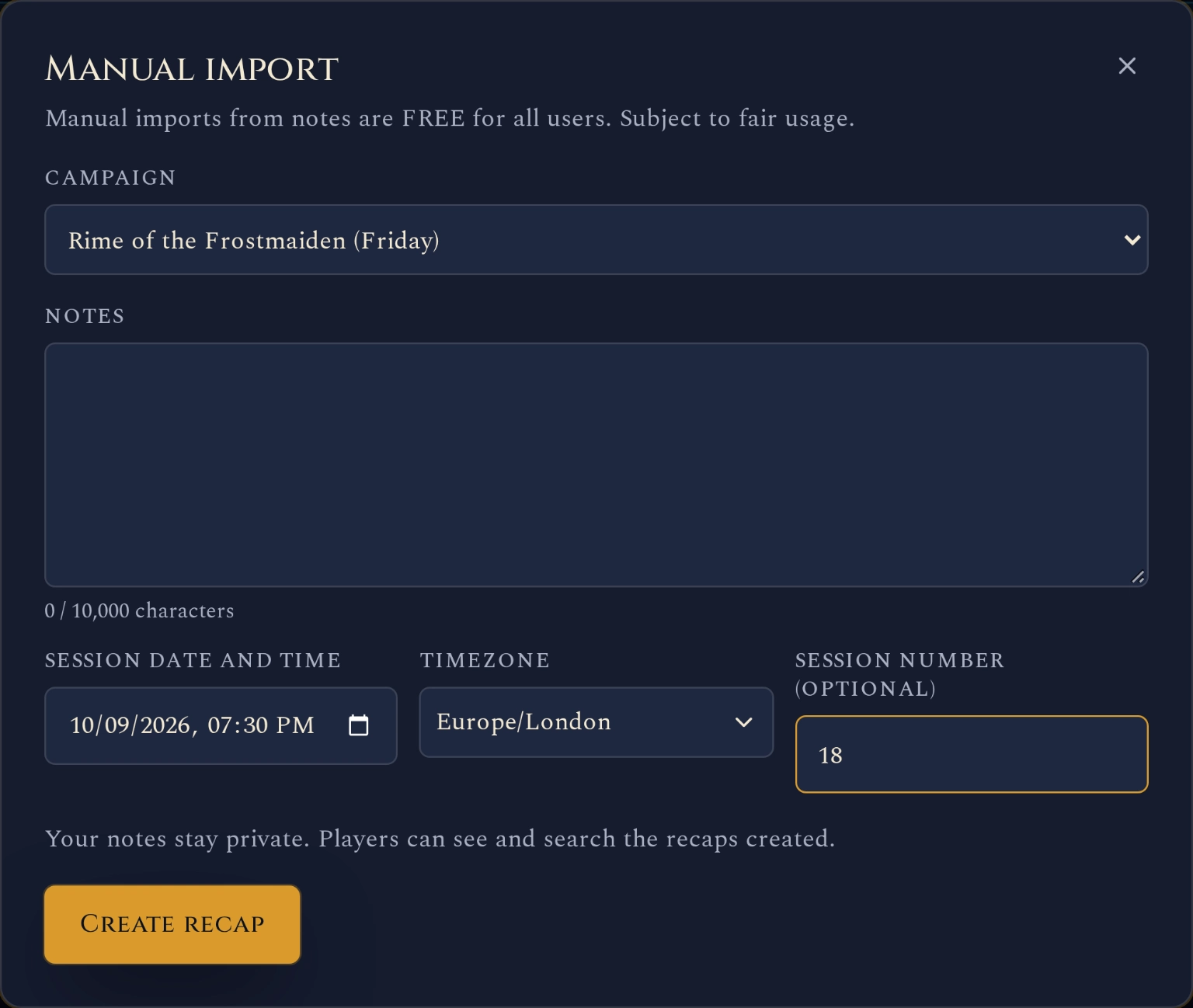
The manual import form, ready for one session’s notes. The date and session number are examples. Imports from notes do not use recording-session credits.
What you get on the free plan
The free plan includes one campaign and four ways to add session history: import written notes, record with our Discord bot, import a Craig recording or upload a transcript. You can mix these as your group plays.
Manual imports have their own allowance. Using one does not spend a recording session, so you can bring in older notes and still use your recording allowance for a new game.
For help preparing the text, follow the notes-to-recap walkthrough. You can also maintain a quest log on the free plan.
| Feature | Free plan includes | How it helps |
|---|---|---|
| Campaign | One campaign | Keep its sessions together |
| Import from notes | 10 manual imports per month, up to 10,000 characters each | Bring in sessions you have already played |
| Recorded sessions | 5 Standard sessions in the first 30 days, then 1 every 30 days; up to 3 hours each | Create a recap from your next recorded game |
| Manual recap editing | Included | Correct names and details |
| Sharing with your table | Private, unlisted recap links or an opt-in public Showcase | Share one session or let readers follow the campaign |
| Campaign Showcase | Optional public campaign publishing | Give the wider world a way to follow the story |
No card is required for the free plan. Manual imports create a compact recap from your notes; recorded Standard sessions also include an MVP Standout Moment and words by speaker. Paid plans offer much more: compare features and pricing to see what is included.
Keep a campaign journal your players can use
A useful campaign journal helps someone answer a question before the next game. Where did we leave the prisoner? What did we promise the ferryman? Why are we going back to Greyford?
Start with notes you already have. A few clear sentences about what happened and what the party decided give the recap something to work with. There is no need to turn every evening into a polished short story before importing it.
If you are deciding what to write down during future games, our session-notes guide covers a lighter approach. Once the notes exist, import them so they sit alongside the rest of the campaign.
That shared history is especially useful for catching up a player who missed a session. Send them the relevant player-safe recap so they can return knowing what the party did and where the next game begins.
Share the story while keeping GM notes private
Your original imported notes stay private to the GM. The generated recap becomes available through the campaign’s existing player access once processing finishes. Players see the recap, rather than the source notes you pasted into the form.
Review the recap and edit anything you want to correct. Sharing it with your table does not automatically list your campaign publicly.
When you want to let other people follow along, Campaign Showcase gives you a public campaign page for free. Choose to publish your campaign and its player-safe recaps; your GM-only notes and private feedback stay private. Readers do not need an account.
Our guide to sharing your D&D campaign online walks through that choice and shows what a visitor can read.
Add recordings when they suit your group
You can keep importing notes from in-person games, or use recording for sessions played on Discord. Both can contribute to the same campaign history. Get everyone’s consent before recording.
The free plan supports Discord bot recording, Craig imports and transcript imports within its session allowance. Our recording guide explains the setup if you want to try it for your next game.
A Standard recorded session includes a title, short summary, scenes and an MVP Standout Moment. Transcript access and words by speaker are included. A manual import has no audio transcript or measured speaking statistics because its source is your written notes.
What changes if you want more?
You can stay on the free plan while its allowances fit your campaign. Paid plans add capacity and features such as richer recaps, PDF exports and advanced session analytics. Memory plans add automatic campaign-memory features and campaign questions with cited answers.
New accounts also receive an eight-hour Premium + Memory welcome session. You can unlock a second eight-hour bonus session within ten days. Those welcome sessions are separate from the ongoing free plan, so trying them does not turn free campaign tracking into a paid subscription.
See the current plans and allowances for the full comparison. To get started, create your campaign and import the notes from a session you already have.
Sources and method
Sources checked on 10 October 2026.
Frequently asked questions
Can I track my D&D campaign for free?
Yes. Recap Raven’s free plan includes one campaign, 10 manual imports from notes per month, a separate recording-session allowance and player-safe recap sharing. You can also choose to publish the campaign in Showcase for free.
Do I need to record my D&D sessions?
No. Paste your existing session notes into Manual import. Raven creates a compact recap from the notes, and the import does not use a recording-session credit.
How many session notes can I import for free?
The free plan includes 10 manual imports per month, with up to 10,000 characters per session. Manual imports are also free on paid plans within their allowances and fair-use limits.
Can my players read my original GM notes?
Original manual-import notes stay private to the GM. Players receive access to the generated recap through the campaign’s existing permissions. Public Showcase publishing shares player-safe content, not GM-only notes or private feedback.
Start tracking your campaign for free with Recap Raven. Bring the notes you already have and give your table a recap to return to.
Free Tier includes 5 Standard sessions in your first 30 days, then 1 every 30 days, each up to 3 hours long, with best-effort multilingual support. A title, short summary and scenes, with basic AI and standard transcription quality. Premium adds richer recaps, PDF exports and GM insights; Memory plans add campaign Ask.