Campaign Showcase
Share your D&D campaign online for free
You tell a friend about something your party did, then realise the explanation needs three sessions of backstory. The recap exists, but it is buried in a Discord channel they cannot read. You want a link you can send them.
Campaign Showcase gives your D&D campaign a public home on Recap Raven. You can share its player-safe recaps with the world for free, while your GM-only notes and private feedback stay private. Anyone can open the campaign and read along without an account.
A public home for the story so far
A Showcase page brings your campaign introduction and published recaps together. Someone arriving for the first time can get a sense of the adventure, then open a session to see what happened at the table.
Here is my Rime of the Frostmaiden campaign. It is the same Friday game I write about in these guides, with its public recaps available for you to explore.
You can send a campaign link to a friend, put it alongside a game listing or share it with someone considering joining the table. They can read the story before deciding whether they want to hear another twenty minutes about the suspicious door.
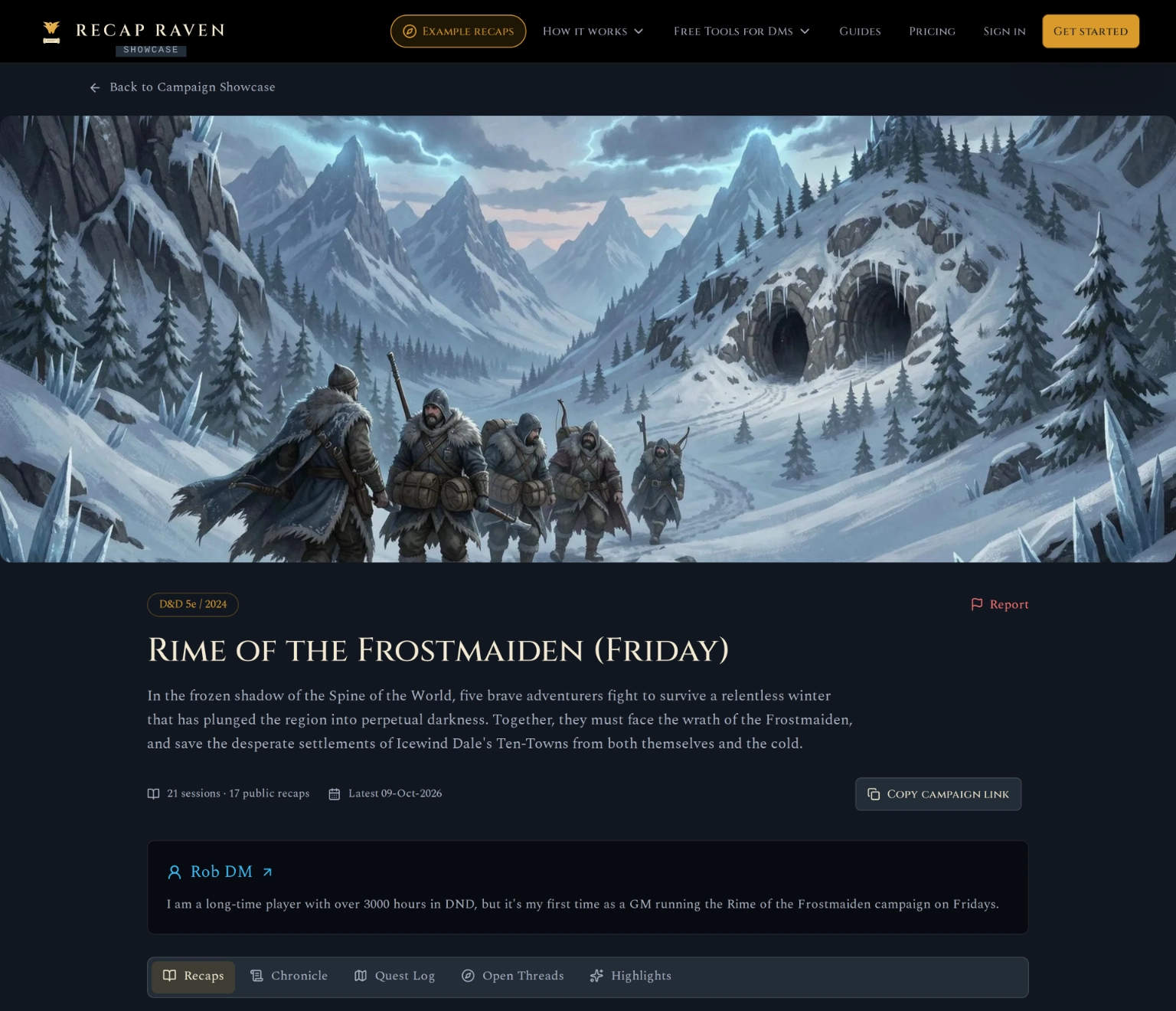
A real campaign page from my Friday game. Open the public campaign to read the latest published recaps.
Choose what you share with the wider world
Your table’s normal recap sharing and public Showcase publishing are separate choices. Creating a recap does not, by itself, put your campaign in the public directory. As the GM, you choose whether to publish the campaign.
You can also share an individual recap through a private, unlisted link without publishing your campaign in Showcase. Send it to your players or a friend who wants to catch up on that session. Anyone with the link can read and forward the player-safe recap; your GM notes stay private.
Showcase uses the player-safe story of what happened at the table. Your GM-only notes and private feedback stay out of the public page. Our player-safe recaps guide explains how that separation works.
You are responsible for what you publish. Review your campaign introduction and recaps before making them public, and check that everyone at your table is comfortable with what you share. Once it is out there, it can be hard to take back: others may save or share copies, even if you later make the campaign private.
| Campaign content | Public Showcase | Your control |
|---|---|---|
| Campaign introduction | Visible on the public campaign page | Write an introduction for new readers |
| Player-safe recaps | Published recaps are readable without an account | Publish automatically, after a one-day delay for review, or only with manual approval |
| GM-only notes and private feedback | Stay private | Keep preparation and feedback with the GM |
| Original manual-import notes | Stay private | Share the resulting player-safe recap |
| Pillars of Play and additional story sections | Shown when supported by published session content | Visitors explore what is available for that campaign |
How to publish your campaign
Once your campaign has a completed player-safe recap, open its Campaign Showcase settings. Introduce the adventure, add a short GM bio and include social links where readers can follow you and your campaign. If you are looking for players, mark the campaign as recruiting and add your game listing links. Then review the recaps that will become public.
Choose how future recaps should be published: automatically, after a day or manually. Confirm that you want to make the campaign public. The publishing screen shows its status while the public page is prepared.
When it is ready, open the public campaign and copy its link. You can change the publishing settings later or make the campaign private again. Turning public sharing off removes it from Showcase; copies someone has already saved or a search engine has indexed may remain.
Explore how other tables play
Browse Campaign Showcase by game system, or look for campaigns marked as looking for players. Read a few recaps to see how a group approaches its adventures. A campaign description tells you the premise; the sessions show what the players actually do.
For help reading the exploration, social interaction and combat charts, see our guide to the three pillars of D&D.
Different campaigns expose different details depending on their published sessions. You can follow the available recaps without needing every campaign to have the same charts or story sections.
Share without a paid subscription
Publishing your campaign in Showcase is free. No card required. Reading public campaigns is free too, and visitors do not need to sign in.
If your campaign history is still in session notes, you can use Recap Raven as a free campaign tracker. Import the notes to create recaps, then choose whether to share those recaps publicly.
Give your campaign a home your players can revisit. Create your free account, add a recap and choose what to share. No card required.
Get started freeSources and method
Sources checked on 10 October 2026.
Frequently asked questions
How can I share my D&D campaign online?
Create a campaign in Recap Raven, add a completed player-safe recap and choose to publish through Campaign Showcase. You receive a public campaign link that anyone can open without an account.
Is Campaign Showcase free?
Yes. Publishing a campaign and reading public campaigns are free. Recording, manual-import allowances and additional features follow the account’s plan.
Can I share just one recap without publishing my campaign?
Yes. Individual recaps support private, unlisted share links, separate from Campaign Showcase. Anyone with the link can read and forward the player-safe recap, while your GM notes stay private.
Will sharing my campaign reveal my GM notes?
Showcase publishes player-safe campaign content. GM-only notes, private feedback and original manual-import notes stay private.
Can I share a campaign without recording it?
Yes. Import existing session notes to create player-safe recaps, then choose to publish them. The free plan includes 10 manual imports per month. Paid plans offer a significantly higher import allowance.
Can I make my campaign private again?
Yes. Turning off public sharing removes the campaign from Showcase and stops its public link working. It does not remove copies people have already saved or that search engines have indexed.
Give your campaign a public home with Recap Raven. Start for free and choose when you are ready to share the story.
Free Tier includes 5 Standard sessions in your first 30 days, then 1 every 30 days, each up to 3 hours long, with best-effort multilingual support. A title, short summary and scenes, with basic AI and standard transcription quality. Premium adds richer recaps, PDF exports and GM insights; Memory plans add campaign Ask.